A Browserosaurus alternative for Mac
Switchman is a Browserosaurus alternative for Mac if you want to keep choosing a browser for external links, with optional rules for repeated decisions. Its classic picker and routing core are free on macOS 13 or later. It is closed source, so it is not a like-for-like replacement for Browserosaurus’s open-source licensing.
Browserosaurus’s GitHub repository says the project is no longer maintained. GitHub marks it as archived on August 2, 2025. The latest release listed when checked on October 6, 2026 was v20.12.0, published July 27, 2025. Those dates describe the upstream project; they do not prove that your installed copy has stopped working.
What Browserosaurus did well
Browserosaurus had a straightforward purpose: set it as your default browser, click a link in a non-browser app, and choose an installed browser from its menu. That gave you a decision at the moment you needed one instead of making you change your system default repeatedly.
Its GPLv3 source was another meaningful benefit. People could inspect the implementation, build it themselves and make changes under that license. The project’s README explicitly describes that freedom and links to inspired projects. If inspectable source is your primary requirement, losing it is a real cost, not a detail to hide behind a feature list.
An archived repository also remains useful documentation. You can read its history and download available releases. Retirement means you should not assume future upstream fixes; it does not justify claims that all versions are broken, unsafe, or incompatible with every current Mac.
Compare the everyday workflow
| Decision | Browserosaurus | Switchman |
|---|---|---|
| External links | Default-browser prompter offering installed browsers | Classic picker at the pointer; rules can skip the prompt |
| Source license | Open source, GPLv3 | Closed source |
| Project status | Repository archived August 2, 2025; README says no longer maintained | Maintained; the app checks for its own updates |
| Mac requirement | README officially supports the maintainer’s current macOS version | macOS 13 or later |
| Choosing and routing | README describes a browser-choice menu | Picker and ordinary browser rules free; Pro $9.90 once |
| Optional extras | Check the archived documentation for your release | Pro adds Ring, Chromium Profile and Arc Space destinations, and iCloud sync |
Browserosaurus sources, checked October 6, 2026: repository and README and v20.12.0 release. The comparison does not treat a feature omitted from its README as proof that it never existed.
What macOS can and cannot do natively
macOS provides one default web-browser application. That system choice does not offer a per-link browser menu or separate rules for Slack, Mail and individual sites. Both Browserosaurus and Switchman fill that gap by receiving the external link first.
You can always change the default back to Safari, Chrome or another browser if you prefer one destination. A chooser is useful when that destination changes often. Neither the default-browser slot nor a chooser should be understood as intercepting every link inside an existing browser tab.
Migrate without recreating unnecessary complexity
- Note the browsers you actually choose. Start with the same small set rather than turning the migration into an inventory of every installed app.
- Install Switchman and make it the default browser. Once you are ready to test, quit Browserosaurus so you are not trying to configure two default-browser handlers at once. You do not need to uninstall it first.
- Choose “Ask every time” in Switchman’s menu bar menu. With no matching rules, external links should stop at the classic picker. Arrange and hide entries in Settings → Applications.
- Test links from apps you use daily. Try Mail, Notes and a chat app that sends links through the system default. Choose a browser normally for a one-off decision; use number shortcuts if you prefer the keyboard.
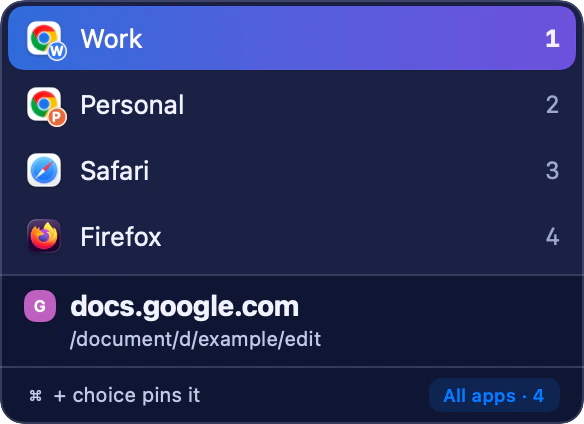
A familiar list-and-shortcuts workflow: choose once, or hold Command to remember the site. Named Profiles are optional Pro destinations. - Add only the routes you want automatic. Command-click remembers a site-wide browser choice. Use Settings → Rules for a specific address, domain or source-app condition.
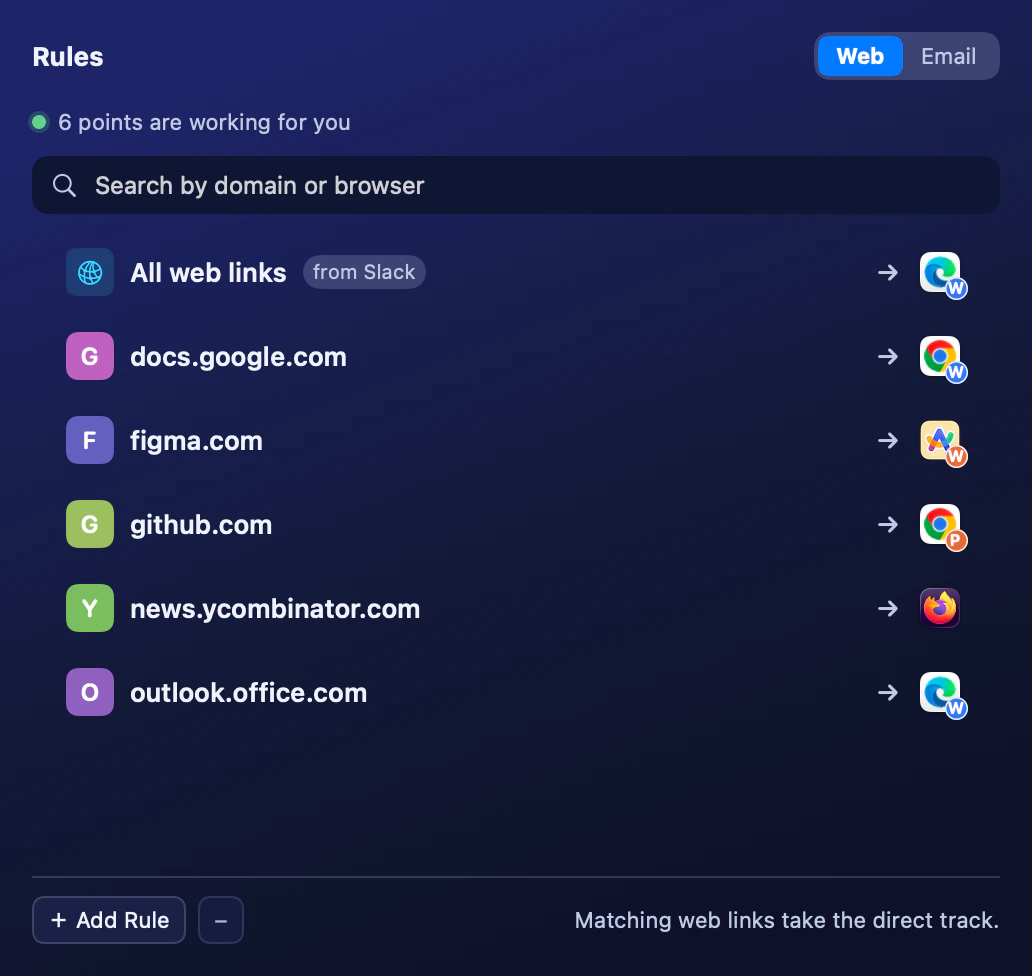
Add automatic routes only where they help. This fixture combines domain rules and one Slack source-app rule.
These are manual migration steps, not a promise that Browserosaurus preferences are imported. Browser sessions and accounts remain in their browsers. Test the actual links and destinations you rely on before deciding whether to remove your old chooser.
What you gain, and what you give up
You gain a native macOS chooser with a free classic picker, keyboard controls and rules for recurring decisions. Number keys 1–9 choose rows; Up and Down change the highlight; Return opens it; Escape cancels without opening the link. The picker is presented at the pointer rather than making you visit a separate settings window for each choice.
You can keep asking for unmatched links, or choose a fallback browser in the menu bar. A matching rule still wins first. Free tracking cleanup is on by default, so review that setting during migration if keeping every incoming query parameter is important to your workflow.
What you give up is access to Switchman’s source under an open-source license. Free routing is a price boundary, not a licensing claim. Optional Pro features cost $9.90 once; ordinary browser picking and source-app rules do not require that purchase.
Limits to check before switching
An app that opens links internally or explicitly targets a browser can bypass the system chooser. If nothing appears, verify Switchman is the default and check that app’s link settings before blaming the picker.
Source-app rules have a cold-start caveat: Switchman identifies the source from the frontmost app when the URL arrives. The first link that launches it after a reboot is not guaranteed to retain that source. Unknown-source links use other applicable rules or the unmatched-link mode.
Free safety warnings may also force a picker with an explanation even when you have automatic routes. They warn about suspicious address shapes; they do not block links or guarantee that an unflagged destination is safe. If open-source inspection matters more than these additions, Browserosaurus’s documented inspired projects are worth investigating separately.
FAQ
Is Browserosaurus still maintained?
Its repository README says it is no longer maintained, and GitHub shows it was archived on August 2, 2025. Checked October 6, 2026, the latest listed release was v20.12.0, published July 27, 2025.
Is Switchman open source like Browserosaurus?
No. Switchman is closed source. Its routing core is free to use, but that does not provide the GPLv3 source access offered by Browserosaurus.
Do I need Pro to replace the browser prompt?
No. The classic picker, ordinary browser rules, tracking cleanup and safety warnings are free. Pro costs $9.90 once and adds optional capabilities such as Ring, browser-persona destinations and iCloud sync.
Must I uninstall Browserosaurus before trying Switchman?
No. Quit Browserosaurus and set Switchman as the default browser when you test. If you decide to go back, select Browserosaurus or your preferred browser as the default again.
Related guides
- Choose a browser for each link on Mac
- Open Slack links in a different browser
- Remove tracking parameters from links
Switchman is free for its routing core. See what Pro adds or return to the Mac browser chooser homepage.