Remove tracking parameters from links on Mac
To remove UTM parameters from links automatically on Mac, set Switchman as your default browser and leave “Remove tracking parameters” enabled in Settings → Advanced. Cleaning is free and on by default. When an external link reaches Switchman, known tracking parameters are removed before rules, the picker and the destination browser see it.
You do not need to trim every newsletter URL by hand. The cleaner operates on the link being opened, whether you choose a browser interactively or let a saved rule route it. It is deliberately conservative: removing known analytics fields is useful; deleting every query parameter would break searches, documents and shared timestamps.
Set up automatic link cleaning
- Install Switchman on macOS 13 or later. Make it the default browser so web links from other apps pass through it before opening in your actual browser.
- Open Settings → Advanced. Check “Remove tracking parameters.” It is already enabled unless you previously turned it off.
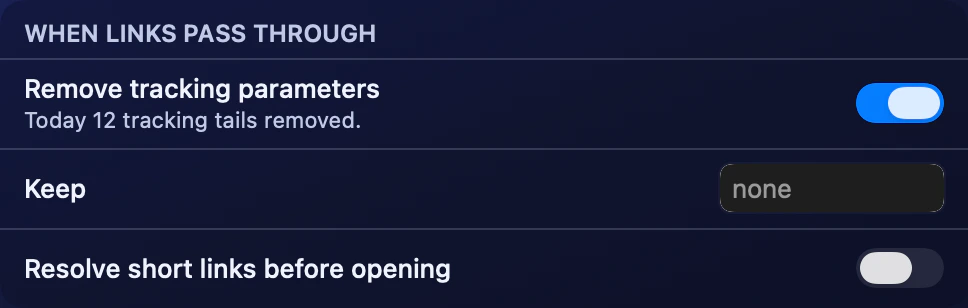
Advanced → When links pass through: tracking-parameter cleaning is on, with no Keep exceptions. The count is fixture data. - Test a link containing a UTM field. Open a newsletter or document URL from Mail or Notes. A field such as
utm_sourceshould disappear from the URL Switchman passes onward. - Keep browser routing as simple as you prefer. Use “Ask every time” for unmatched links or select a fallback browser from the menu bar. Cleaning applies before either route.
- Add an exception only if needed. If a site relies on a parameter that would otherwise be removed, put that exact parameter name in the Keep field and submit it.
For a controlled check, compare the link Switchman displays with the original you clicked. A destination website may add new parameters after it loads; that later change is not evidence that the incoming URL was left untouched.
What macOS can and cannot do natively
The default-browser setting chooses which app receives a web link. It is not a general-purpose list of query parameters to remove before links from every app open. Browser privacy features may handle some tracking in their own context, but that is different from a configurable cleanup step before choosing among browsers.
You can edit a URL manually, and that is reasonable for an occasional link. Keep the functional parts: a search query or video identifier may be essential. Automatic cleaning is useful when the same familiar tracking tails arrive repeatedly from email and chat.
Switchman only cleans links it receives. It does not go through your browsing history, rewrite existing bookmarks, edit Slack messages, or monitor every navigation inside a browser. A browser extension or a source app’s internal view is a different interception point.
The exact tracking names and families removed
Switchman removes query parameter names beginning with utm_, pk_, hsa_ or matomo_. This includes familiar names such as utm_source, utm_medium and utm_campaign, as well as other names in those families. Matching is case-insensitive.
The individual names in the cleaner are listed below. They are exact parameter names, not patterns that delete similarly spelled functional fields.
- Google:
gclid,dclid,gbraid,wbraid,gclsrc,gad_source. - Meta and Microsoft:
fbclid,msclkid. - Other social and advertising identifiers:
twclid,ttclid,li_fat_id,igshid,igsh,yclid. - Email and marketing:
mc_cid,mc_eid,mkt_tok,_hsenc,_hsmi,_kx,vero_id,vero_conv. - Additional analytics identifiers:
oly_enc_id,oly_anon_id,s_kwcid,ef_id,_openstat,wickedid,rb_clickid,epik.
Generic names such as ref, id and si are not on the removal list. A name that tracks a referral on one site may select a real resource on another. Leaving it intact avoids guessing about the site’s meaning.
What stays in the link
The cleaner preserves the remaining query items and their order, including repeated items, and keeps the fragment after the hash sign. If every query item was tracking, it removes the now-empty question mark too. The page address should remain useful rather than merely look shorter.
A Keep exception applies to an exact parameter name, case-insensitively. Entering utm_source preserves that name, not every name beginning with utm_. Exceptions are global parameter-name preferences, not per-site rules. If you keep one for a particular service, remember it can also remain on links to other sites.
Cleaning happens before exact-address rule matching. Two shares that differ only in removed tracking fields can therefore reach the same rule. When diagnosing an exact-address rule, compare it with the cleaned URL rather than assuming the original tracking tail is still present.
Short links are a different job
A youtu.be URL with one video path segment is expanded locally to a YouTube watch URL. Existing query items and the fragment are carried across, so a shared timestamp is preserved. This rewrite is free, works without a network request, and is applied even when tracking cleanup is disabled.
Other shortened URLs may hide their destination behind a server redirect. Discovering that destination requires network access; Switchman’s “Resolve short links before opening” setting is separate, off by default, and requires Pro. Pro costs $9.90 once. Local rewriting is not a claim that every short link can be expanded offline.
Limits, privacy and broken-link checks
Parameter removal itself runs locally. It is not anonymization: websites can still use cookies, accounts and other information after your browser visits them. Cleaning also does not remove unknown identifiers, tracking embedded in a path, or fields added by a destination after navigation.
If a link behaves differently, try keeping the suspected parameter or temporarily disabling cleaning, then compare the results. Avoid deleting all fields just to produce a shorter address. A suspicious-address warning is separate from cleanup: free safety checks may force the picker with a reason, but they do not block a link or promise the destination is safe.
FAQ
Is automatic UTM removal free and enabled by default?
Yes. Tracking-parameter cleaning is part of the free routing core and is on by default. Its switch is in Settings → Advanced.
Does Switchman remove si, ref or id?
No. Those generic names are not in the cleaner’s removal list because they can have functional meanings. The cleaner removes its listed tracking names and four prefix families unless an exact-name exception applies.
Can I keep a parameter that a site needs?
Yes. Enter its exact name in the Keep field in Settings → Advanced. Matching is case-insensitive, and the exception applies across sites rather than to just one domain.
Is expanding youtu.be the same as resolving every short link?
No. A supported youtu.be video URL is rewritten locally without a network request. Network-based short-link resolution is a separate Pro setting that is off by default.
Related guides
- Choose a browser for each link on Mac
- Open Slack links in a different browser
- Open links in a private window
Switchman is free for its routing core. See what Pro adds or return to the Mac browser chooser homepage.